Do I need a TSA Waiver for a flight to the US?

If you’re heading to the US and are trying to work out whether you need a TSA Waiver for your flight, we have an Opsicle to help with that.
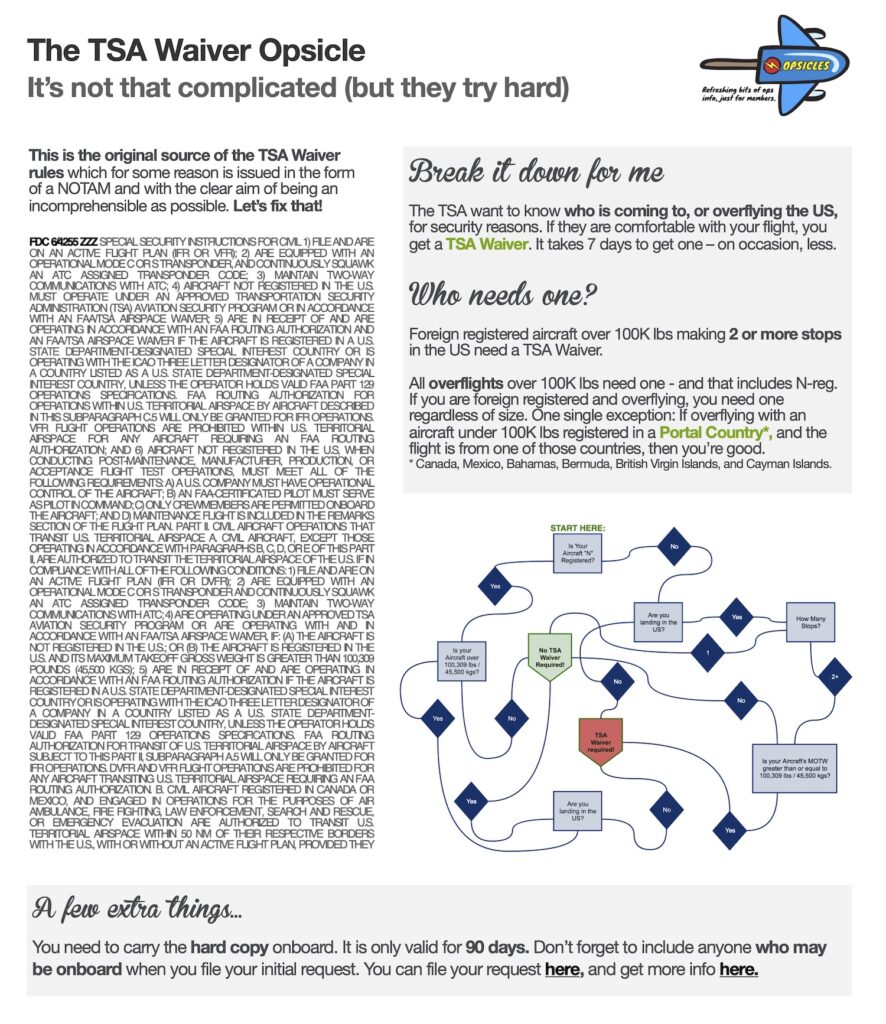
Click to download PDF.
OPSGROUP members can download a copy for free here.
If you’re not an OPSGROUP member, but you’d like to be, you can join here.
Let’s start with the basics
Here is the TSA Waiver site. This is where you submit your requests.
And here is the TSA site on waivers. This is where you can find info on Waivers.
Which Waiver is Right for You?
There are a few types. You have your Disney Theme Park, Washington DC Special Flight Rules Area/Flight Restricted Zone, Major Sporting Events and Special Events Waivers.
And then you have your International Waivers which include International Air Ambulance, No Transponder and International Single Trip Waivers – this last one is what we’re interested in.
The Disney Zone
The Guidance
International Waivers are required for ‘various aircraft to fly within US airspace, which includes the airspace above the United States and its territories’.
Whether you need one depends on your aircraft size, where it is registered and where you’re coming from.
Flying to and from the US
International TSA Waivers are not required for any aircraft arriving to or departing from the US or its territories. So this applies if you only make one stop in the US (i.e. you fly in and straight back out again).
Flying within US airspace
Planning to make more than one stop in the US? You’ll need an International Waiver if you do this in a foreign registered aircraft which is heavier than 100,309 pounds MTOW (45,500 kg).
But, since most private aircraft generally fit under this weight limit, you probably don’t need one.
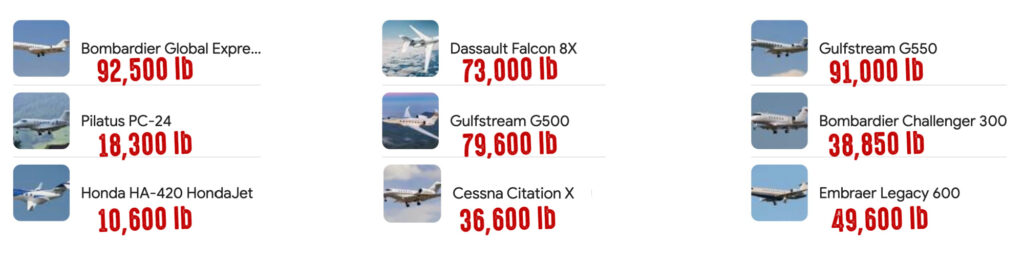
Most Bizjets are under the weight restriction.
Overflying the US
OK, here we go, the bit to know – this is for when you take off and land somewhere not in the US or its territories, and overfly the US in between.
If your aircraft weighs 100,309 lbs MTOW or more: you need a Waiver, even if your aircraft is US registered.
If your aircraft weighs less than 100,309 lbs MTOW: US registered aircraft do not need one. If you are foreign registered and overflying, you do need one – unless your aircraft is registered in a “Portal Country”, and is flying directly from any one of these (prior to entering US airspace).
The Portal Countries:
- Canada
- Mexico
- Bahamas
- Bermuda
- Cayman Islands
- British Virgin Islands
Special Interest Countries
The black sheep of the World of Waivers. Probably the easiest category to work out the rules for. You’ll need an International Waiver for everything – ops to, from, within and over the US, if your aircraft is registered in one of these countries. The list currently includes: Cuba, Iran, North Korea, China, Russia, Sudan, and Syria.
To recap…
Landings: Foreign registered aircraft over 100K lbs making 2 or more stops in the US need a Waiver.
Overflights: All overflights over 100K lbs need one – and that includes N-reg. If you are foreign registered and overflying, you need one regardless of size. There’s one single exception: If overflying with an aircraft under 100K lbs registered in a Portal Country, and the flight is from any of those countries, then you’re good.
Special Interest Countries: Aircraft registered in these need a Waiver for everything – ops to, from, within and over the US.
Where is this officially written?
There were some official, permanent Notams published back in 2016. FDC 6/4255 and FDC 6/4256 (KFDC A0006/15 and A0006/16). These have vanished though and we can’t find any replacements.
The best spot to read it (officially) seems to be in the AIM Chapter 5 (Air Traffic Procedures), Section 6 (National Security and Interception Procedures), and take a look at 5-6-7 for the stuff on transiting US airspace.
How to get it and what to do with it.
You need to submit your request to the Authorization Office here. It is recommended that you submit your request at least 7 days before your planned flight to the US.
When you apply, don’t forget to include all those who may be onboard in your request.
Once you have it, it is only valid for 90 days. You need to carry the hard copy onboard with you.
Any other things to know?
If you do operate over US airspace then you need to stick to their rules which also require that you:
- Use an active VFR or IFR flight plan
- Be equipped with a Mode C or S transponder and use an ATC-assigned transponder code
- Communicate clearly with ATC
Any other gotchas?
A couple, as reported by an OPSGROUP member:
Watch your weight: One in particular issue I have seen a few times is that of Private Global 7500s. Most owners of this aircraft are usually stepping up from a previous version like the Global 6000 series. Many fail to recognize that this step up has a significant impact on their US TSA requirements. I think most miss the weight class change and simply think of the aircraft as a Global XRS with better range. The implications of not having a valid waiver can be significant.
Validity period: A waiver can be valid for “up to 90 days” with the required dates being set during the initial application. A waiver may be modified up to three times with the end date being fixed (i.e. the end date on the original application must remain the same for each subsequent modification). There is a caveat I should mention regarding the number of allowed modifications, being that this is only valid within a calendar year.
Anything we missed?
Let us know, at team@ops.group

 Unfortunately, sometimes folk