ACARS Oceanic Clearances on the NAT

There is a revised NAT OPS Bulletin that was issued June 14. Bulletin 2020_001 is all about ACARS Data Link Oceanic Clearances.

It puts all the procedures for CZQX/Gander, BIRD/Reykjavik, ENOB/Bodø, EGGX/Shanwick and LPPO/Santa Maria into one spot, instead of having them spread between all the different individual ANSP NAT OPS Bulletins.

When we compared the old version of the Bulletin with this new one there aren’t really any big differences at all. Essentially none, in fact. But since we recently confused ourselves a lot over all things ACARS related, here is a refresher summary of what it says…

Have a read of the intro first

Point 2.2 of the introduction says this:

“The ACARS Data link oceanic clearance service is provided by means of VHF and satellite to ACARS equipped aircraft via communications service providers ARINC and SITA. It should not be confused with FANS 1/A CPDLC.”

(I totally confused these earlier, despite having used both.)

“Operators intending to participate in the ACARS data link process are required to contact their communications service provider and indicate they would like to receive the service.”

So that means the likes of ARINC and SITA.

The Procedures (in short)

1. Put the ACARS logon in, along with your flight number and the OCA facility.

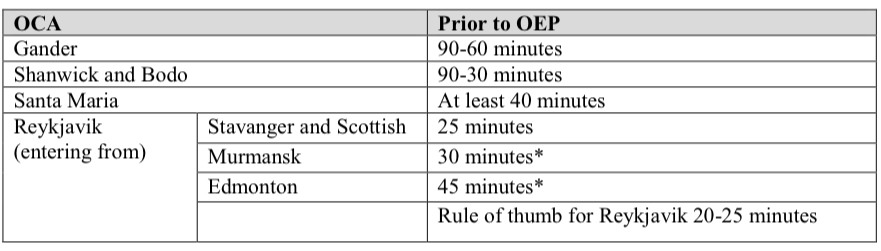
2. Make sure you request your clearance at the right time (not too early, not too late). Here is the current table of timings:
Not too soon, not too late, or rule of thumb…

(This is the only change we spotted from the old one – Gander used to say 90-30 minutes, now it says 90-60 minutes.)

3. Make sure your RCL has all the right stuff in it:

  • The OEP (this means Oceanic Entry Point, not to be confused with OAPs which mean old person)
  • Your ETA for the OEP
  • The requested flight level
  • The highest acceptable flight level you could reach by the OEP. This goes in the free text section by putting MAX F123

4. If you don’t get some sort of “RCL Received” message within 5 minutes of sending it then you’re going to have to use voice instead.

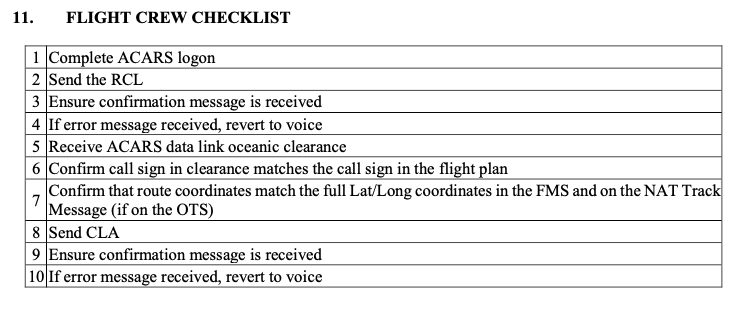
5. Once you get your clearance, check it well. That means checking the LATs and LONGs in your FMC. If the clearance doesn’t match your flight plan, then both pilots should independently confirm the coordinates and points. If you don’t like your clearance then negotiate by voice, otherwise send your CLA (clearance acknowledgement). If you don’t have that function, do it with your mouth.
Some peculiarities with each of the OCAs

Gander

  • If you’re departing somewhere less than 45 minutes from your Gander OEP, then get your clearance 10 minutes before you depart.
  • Sometimes you might get an ACARS oceanic clearance before you’ve even sent the RCL.
  • If you fly an aircraft that is not able to send an RCL, then you can set yourself up for Gander’s special service but need to do it in advance:
    • Get in touch with your comms service provider and NavCanada
    • Put AGCS in item 18 of your flight plan
    • Expect to receive your clearance automatically once you logon

Shanwick

  • You must not enter Shanwick without a clearance.
  • If you’re flying between and Irish and a Scottish airport, its not very far, so might want to get your clearance before departure.
  • You get 2 chances with Shanwick. If at first you don’t succeed (you don’t get the RCL received confirmation) then try again.
  • If you’ve left it too late and are within 15 minutes of your OEP, you ain’t going to get your clearance via ACARS.

Reykjavik

  • They don’t give clearances via ACARS if you’re departing from an airport in Iceland, Greenland or the Faroe Islands. Get it from whoever you’re talking to on the ground before you go.

Santa Maria

  • You don’t need an RCL if you’re departing from the Azores, you’ll get it through the (VHF) radio or possibly get a CPDLC route confirmation before you head out into the great blue yonder.

Other helpful stuff in the bulletin

Inmarsat datalink probably won’t work above N82°. Iridium and HF datalink should.
The flight level in the clearance is not a clearance to climb. ATC need to clear you, and need to make sure you reach it before the OEP. But… if you lose comms then this is the cleared oceanic flight level.
Contacts:

Gander: Robert Fleming robert.fleming@navcanada.ca
Reykjavik: Bjarni K. Stefansson bjarni.stefansson@isavia.is
Bodo: Kenneth Berg Kenneth.volden.berg@avinor.no
Shanwick: Iain Brown iain.brown@nats.co.uk
Santa Maria: Jose Cabral jose.cabral@nav.pt

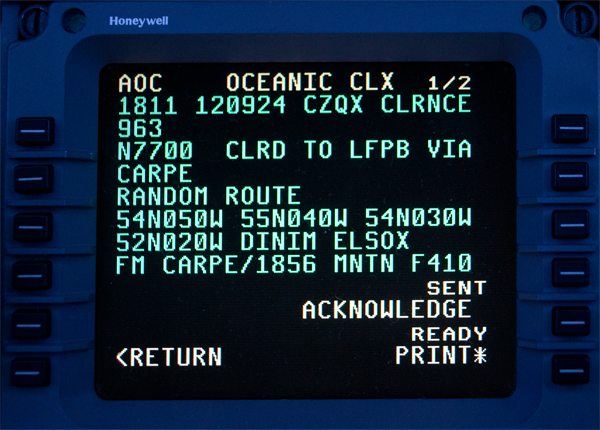
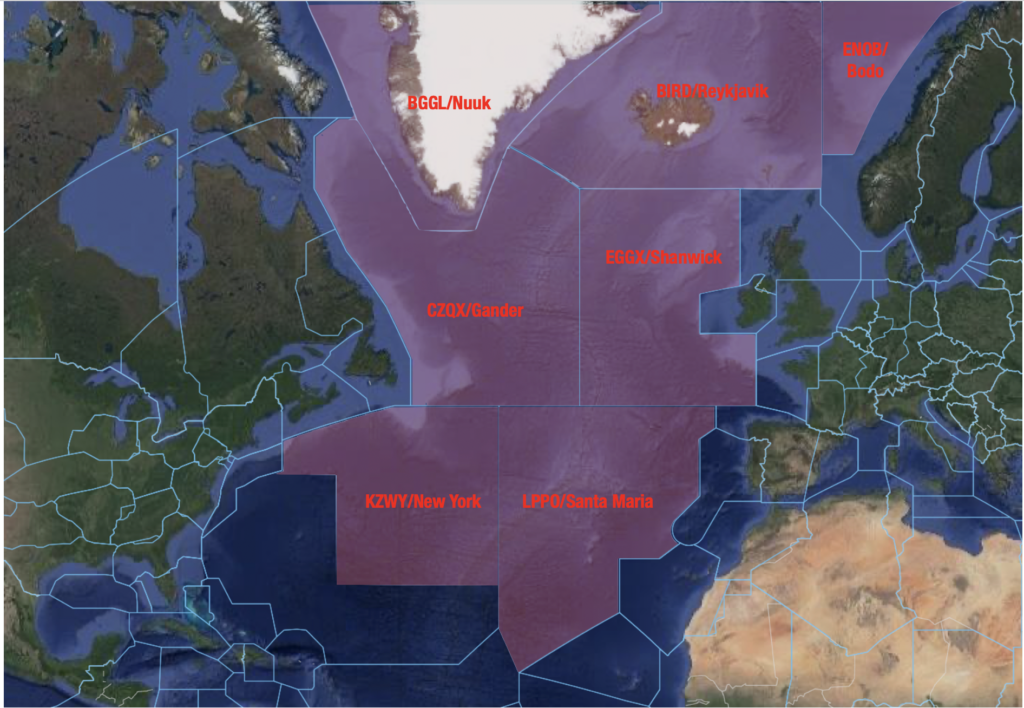
We have Clearance, Clarence

You carefully type it up, have the other pilot check it, then hit send… and wait… your airplane is creeping closer and closer to the Oceanic Entry Point and still no reply, and then DISASTER! Clearance Request Rejected! Or worse still, you just never get a response…

Here are some hints, tips (and actual procedures) related to getting your Oceanic Clearance for the NAT HLA. And what to do if you don’t…

How to get your clearance.

There is a datalink mandate across the vast majority of the NAT HLA which means everything has headed towards “messages” rather than voice. Why? Because it’s easier and there is a lot less risk of mess-ups and mix ups. So, most likely, you are going to be requesting your clearances via “message” as well. The system it goes through is generally the Arinc 623 – the same you use for things like your D-ATS. Contrary to CPDLC, A623 exchanges don’t require previous notification. But enough of that technical schtuff.

If you ttake a look through the North Atlantic section of *whichever manual* you are using and somewhere under COM and ATC Communications you will find a section on ‘Oceanic Clearance Request via Data Link’. Each OCA has its own thing to say in terms of times to send it and reverting to voice, but in general the message you want to send when requesting your clearance is the same for them all.

You need to include Entry Point, ETA for Entry Point, Requested Mach Number, Requested Flight Level and add a remark (RMK/) indicating preferred alternative (another NAT Track) and MAX FL. You only have 80 characters available to you so don’t go adding extra comments in, it will probably just get rejected.

After sending your clearance request you should receive an advisory message which says something like this –

“IF NO CLEARANCE RECEIVED WITHIN 30 MINUTES OF OCEANIC ENTRY PONT REVERT TO VOICE PROCEDURES END OF MESSAGE”

If you don’t receive this within about 5 minutes of sending the question, something has possibly gone wrong. Try sending again if you can still meet the minimum time to boundary for a request, or revert to voice.

The times you want to think about sending your RCL through at vary from OCA to OCA, as do the logon addresses, so here is a rundown of each one…

Shanwick

  • The logon is EGGX.
  • Shanwick want your request sent no later than 30 minutes before the OCA boundary, but no earlier than 90 minutes or they’ll reject it.
  • If you haven’t received your clearance and are within 15 minutes of the OCA boundary then revert to voice. If you are East of 020W then try Shanwick Radio on 127.9 to help reduce chatter on HF. Only give HF a go if you are within 40 minutes of the boundary and having issues getting VHF signal.
  • For Shanwick Oceanic you have two frequencies – 123.950 is for aircraft registered in States West of 030W. 127.650 is for aircraft registered in States East of 030W.

Gander

  • The logon is CZQX
  • The request should be sent just after the aircraft gets within 90 minutes of the OEP. If you don’t receive the advisory message within 5 minutes, or if you haven’t received a clearance and are within 30 minutes of the OEP then revert to voice.
  • Gander is a little tricky with working out which frequency to use. It comes down to where you are routing via:
    • Natashquan 135.460
    • Allan’s Island 128.450
    • Churchill Falls 128.7
    • Stephenville 135.050
    • Sydney 119.425
    • Brevvoort 132.025
    • Kuujjuaq 134.2

Reykjavik

  • The logon is BIRD.
  • How far in advance you need to request your RCL depends on where you are entering from (which CTA). The time is the minimum time from the BIRD CTA Entry Point that they should receive your RCL by and the general rule is 20-25 minutes.
    • Stavanger (ENOR) 25 mins
    • Scottish (EGPX) 25 mins
    • Edmonton (CZEG) 45 mins
    • Murmansk (ULMM) 30 mins
  • If you have Inmarsat datalink then you probably won’t be able to get your clearance while north of 82°N. If you’re on an Iridium or HF datalink system then you’re in luck.
  • If you have to get your clearance via voice then you can try Iceland Radio on VHF Primary 127.850 or Secondary 129.625. They are also on the HF B, C and D families but you’re having a bad day if it’s reaching that level.

Bodø

  • The logon is ENOB.
  • Request your clearance at least 30 minutes before the NAT region boundary. Revert to voice if you’re within the 20 minutes mark on 127.725.

Santa Maria

  • The logon is LPPO.
  • Send your request 40 minutes before the OEP. If you need to request clearance by voice then talk to Santa Maria Radio on 127.9 or 132.075.

New York

  • The logon is KZWY.
  • This works a little differently if you are routing from the US because your clearance is going to be included in your departure clearance (since you’re basically in the area anyway). You can logon 30-45 minutes before.

What to do if you don’t get a clearance?

Shanwick is really the main one to worry about – having a clearance (being in contact with ATC) is pretty darned important there because it is such a big area and extremely busy.

Always give yourself time. If a clearance isn’t received, try by voice. If you can’t get through then try other frequencies and ATCs. If you reach a boundary without a clearance then chances are it’s because you have some sort of comms loss in which case this is now your bigger concern.

In theory, you could enter the NAT HLA (aside from via Shanwick) without a clearance (with loss of comms) and fly as per your flight plan route (Mach and Levels) but it really, really isn’t advisable.

What to do when you do get your clearance.

It goes without saying that first up you need to acknowledge it with ATC. After that you’ll want to check it, and get the other pilot to as well. Printing it out is a good way to do this if you have that option. “Checking it” means checking what you’ve been cleared to do is what you’re asking the aircraft to do via its nav computer.

Finally, make sure you really are flying it by monitoring it and doing your plotting (or equivalent) checks. You can read about that here if you’re not sure how.

A helpful summary.

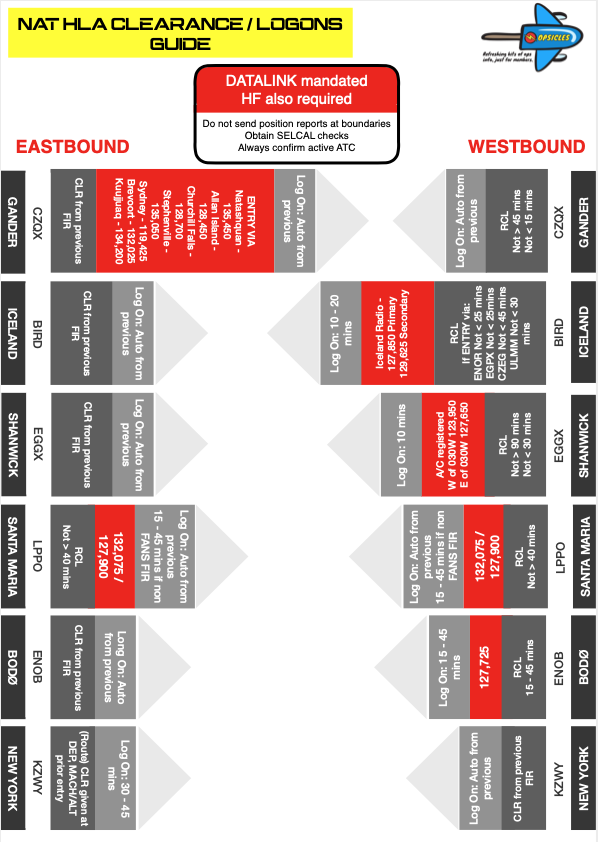
We created a little Opsicle  – a refreshing bit of ops info, just for members. Which means if you are an OPSGROUP member you can click on the pic to get yours. This one summarises all the logon info we wrote about above!

Where is the official info?

The info is contained in AIPs, and some of it within ICAO NAT Doc 007.

We might have missed some things, or made a mistake so if you spot one let us know!